The SB200's shifters are equipped with buttons that allow you to control various features and functions in certain apps, depending on the bike profile you have selected. Apps that support the SB200's buttons include:
- Stages Cycling app
- Zwift
- Trainingpeaks Virtual
- MyWoosh
You can use either the default controls listed below or customize them within the Stages Cycling app.
Default Controls
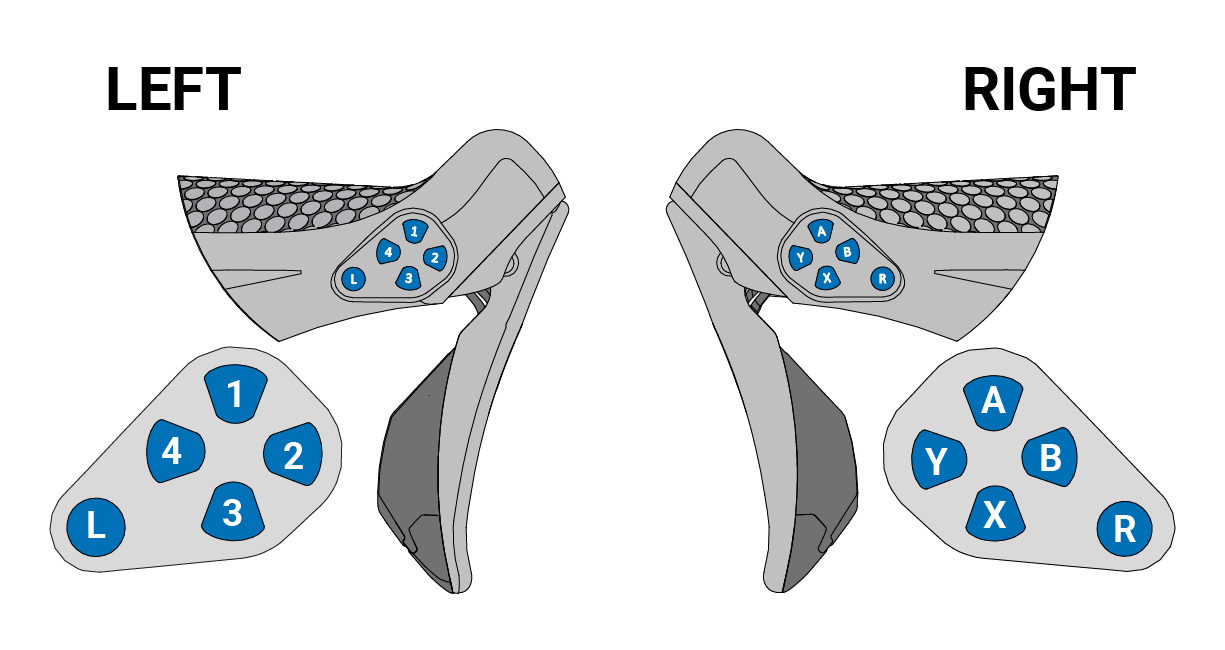
| Button | Stages | Zwift | TrainingPeaks Virtual | MyWhoosh |
| 1 | Open widget | Navigate up/Open action bar | Navigate up | Navigate up |
| 2 | Navigate right | Navigate right | Navigate right | Navigate right |
| 3 | Close widget | Navigate down/U-turn | Navigate down | Navigate down |
| 4 | Navigate left | Navigate left | Navigate left | Navigate left |
| L | Decrease difficulty | Steer left | Steer left | Steer left |
| Button | Stages | Zwift | TrainingPeaks Virtual | MyWhoosh |
| A | Start/Stop workout | Select/Confirm | Select/Confirm | Select/Confirm |
| B | Toggle mode | Power-up 1 | Back/Cancel | Back/Cancel |
| X | Previous interval | Emote/Ride-on bomb | Lap | Lap |
| Y | Lap/Next interval | Go back/Open menu | Mode | Mode |
| R | Increase difficulty | Steer right | Steer right | Steer right |
Was this article helpful?
That’s Great!
Thank you for your feedback
Sorry! We couldn't be helpful
Thank you for your feedback
Feedback sent
We appreciate your effort and will try to fix the article